Customer conversations, on your own number.
A shared inbox, a visual chatbot builder and contact management for teams that talk to customers on WhatsApp. Your business account stays yours, and Meta bills you at Meta's own rates.
30-day trial. No card required.
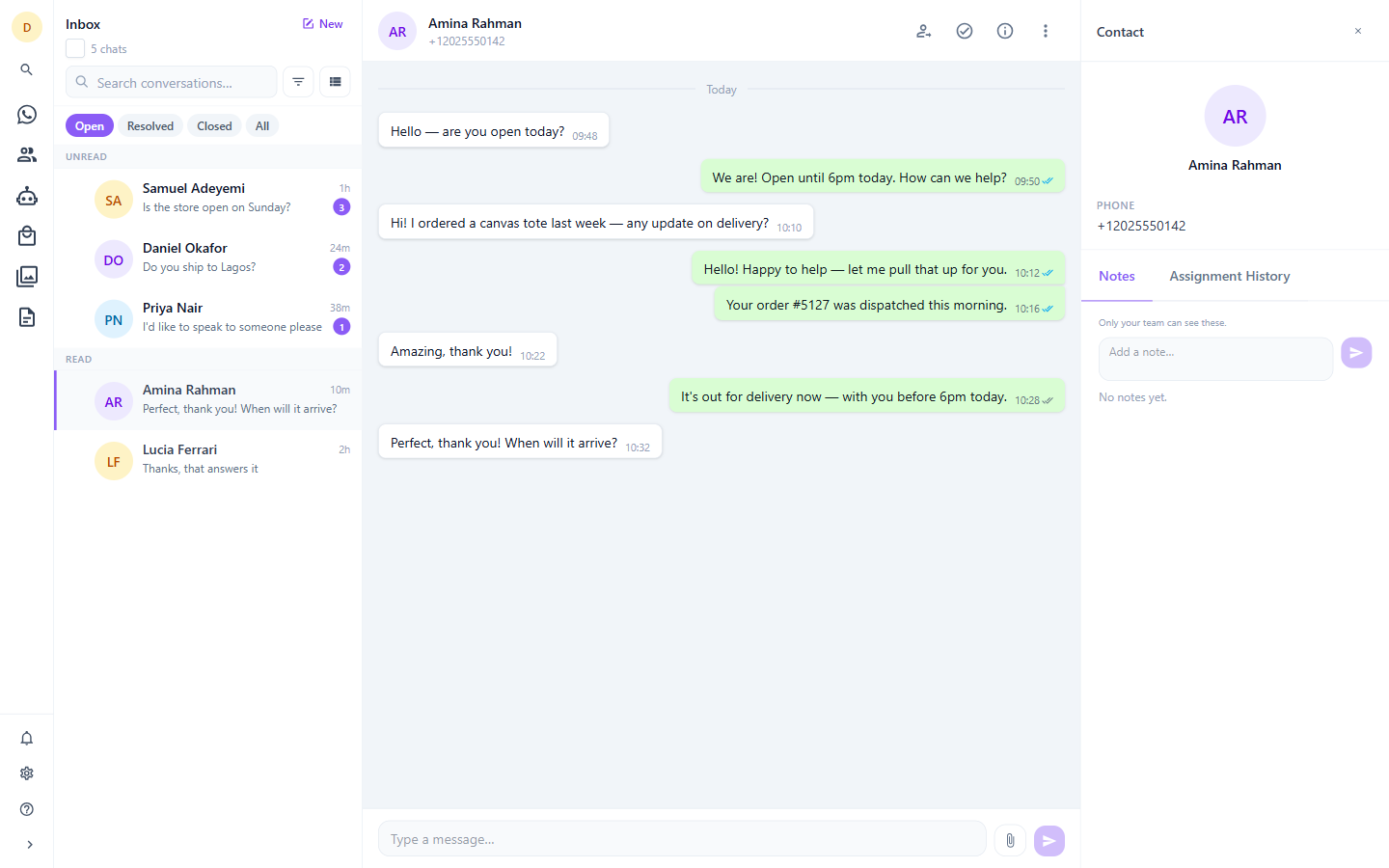
Built on the WhatsApp Business Platform, with your business account registered to you.
How we charge
No per-message markup. Ever.
Most providers resell your messaging. They buy conversations from Meta, add a margin, and bill you per message — so your costs rise with every customer you talk to, and you never see the real rate.
MapleChat does not touch that transaction. You register your own WhatsApp Business Account, attach your own payment method, and Meta invoices you directly at published rates. We charge a flat subscription for the software and nothing else.
Your account, your asset
The WhatsApp Business Account is registered to your business. If you ever leave, it goes with you — there is no number to migrate and no history held hostage.
Meta's rates, unmarked
Conversation charges appear on your Meta invoice, at the rate Meta publishes. We never see the money and take no cut of it.
Priced on capability, not volume
Plans differ by what the software does, never by how many messages you send. A busy month costs you nothing extra in subscription.
The platform
Everything your team needs in one inbox
Shared inbox
Every conversation in one place, with assignment, handoff, private notes and saved filters. Built for a team, not a single phone.
Chatbot builder
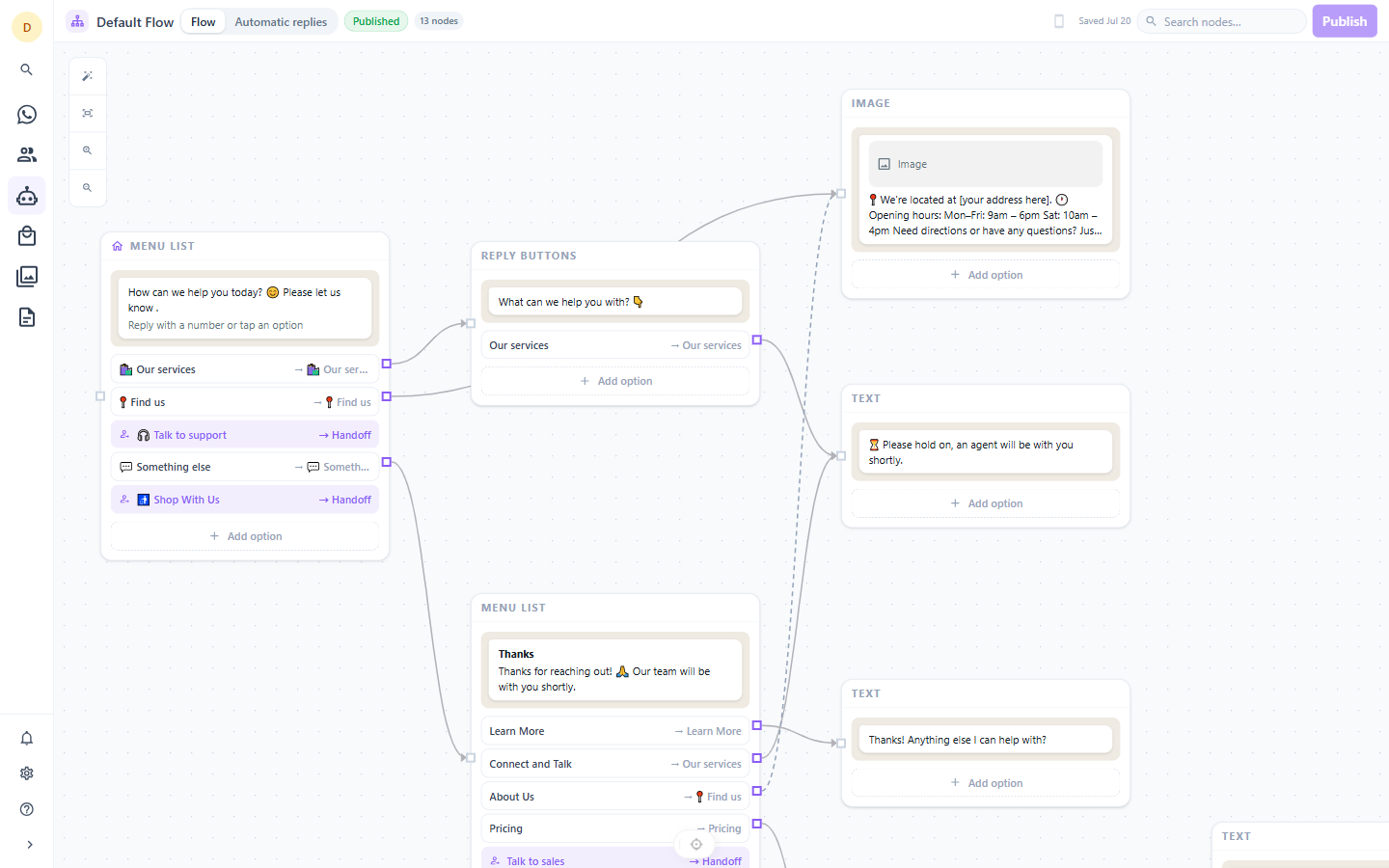
Design automated conversations on a visual canvas. Buttons, lists, media and menus — no code, and a live preview of what the customer sees.
Contacts
Customer records with tags and lists, bulk CSV import with column mapping and per-row validation, and one-click export.
Teams & handoff
Five roles, named teams and round-robin routing. The bot escalates to a queue, a team or a specific agent.
Message templates
Your approved templates, synced from Meta with live status and quality ratings, ready to send.
Media library
Upload once, reuse anywhere. Images, video, audio, documents and stickers, deduplicated and available to every flow.
Getting started
Connected in an afternoon
- 1
Connect your number
Sign up through Meta's Embedded Signup in a single popup. Create a new WhatsApp Business Account or attach the one you already run.
- 2
Invite your team
Add colleagues, group them into teams and give each the role they need — from full Owner down to read-only Viewer.
- 3
Turn on automation
Every new number starts with a working starter flow. Edit it on the canvas, publish, and it answers from the next message onward.
Automation
A chatbot you can actually see
Flows are a graph, so we let you edit them as one. Each node is the exact WhatsApp message your customer receives — interactive buttons, list menus, media, locations. Draw a connection and that becomes the button they tap.
- Fifteen message types, rendered exactly as they appear on a phone
- Nine named entry points — greeting, main menu, fallback, off-hours and more
- Publishing takes an immutable snapshot, so live conversations never break mid-edit
- Escalate to a queue, a team or a named agent from any button
Trust
Isolation enforced by the database
Separation between customers is enforced in Postgres itself with row-level security, not only in application code. A query that forgets its tenant filter returns nothing rather than somebody else's data — the default outcome of a mistake is no data, not the wrong data.
Read how we handle securityStraightforward pricing
One subscription for the software. Meta bills you separately for conversations, at their rate.
See plansCommon questions
- Do I need an existing WhatsApp Business Account?
- No. You can create one during signup, or connect an account you already run. Either way it is registered to your business, not to us.
- What does Meta charge on top?
- Meta bills conversations directly to the payment method on your WhatsApp Business Account, at their published rates. We never add to it and never see it. Current pricing is on Meta's own site.
- Can I keep my existing number?
- Yes, provided it is not currently active on the consumer WhatsApp app. Meta requires a number to be registered to one or the other.
- What happens when the trial ends?
- You choose a plan. There is no free-forever tier — we would rather charge fairly than run an ad-supported or data-supported model.
- Can I leave and take my account?
- Yes. The WhatsApp Business Account is yours. Disconnecting MapleChat ends our access and leaves your number, history and quality rating with you. You can export your contacts first, and ask us for anything else you need.
Start talking to customers properly
Thirty days, every feature, no card.